dlq-triage
Failed messages pile up in a queue. Which ones are the same problem, and is it safe to retry them?
A web tool for the “dead-letter queue” — the holding area where messages land after a system gives up on them. It sorts them by cause, lets a person retry one group at a time, and keeps a record of who did what.
// why this exists
A pile of failures with no way to tell them apart
Think of a loan application that moves between several systems. If one system is down, the message is retried a few times and then set aside in a “dead-letter queue” so it isn't lost. Over a few days that queue fills up.
Looking inside, every message looks much like the others. The usual options are both bad: read them one by one, or press “retry all” and hope. If the real cause is still there, they all fail again. If several different problems are mixed together, you can't tell which one you fixed.
dlq-triage answers the first question for you: how many different problems are in here?
// the test data: 24 failed messages
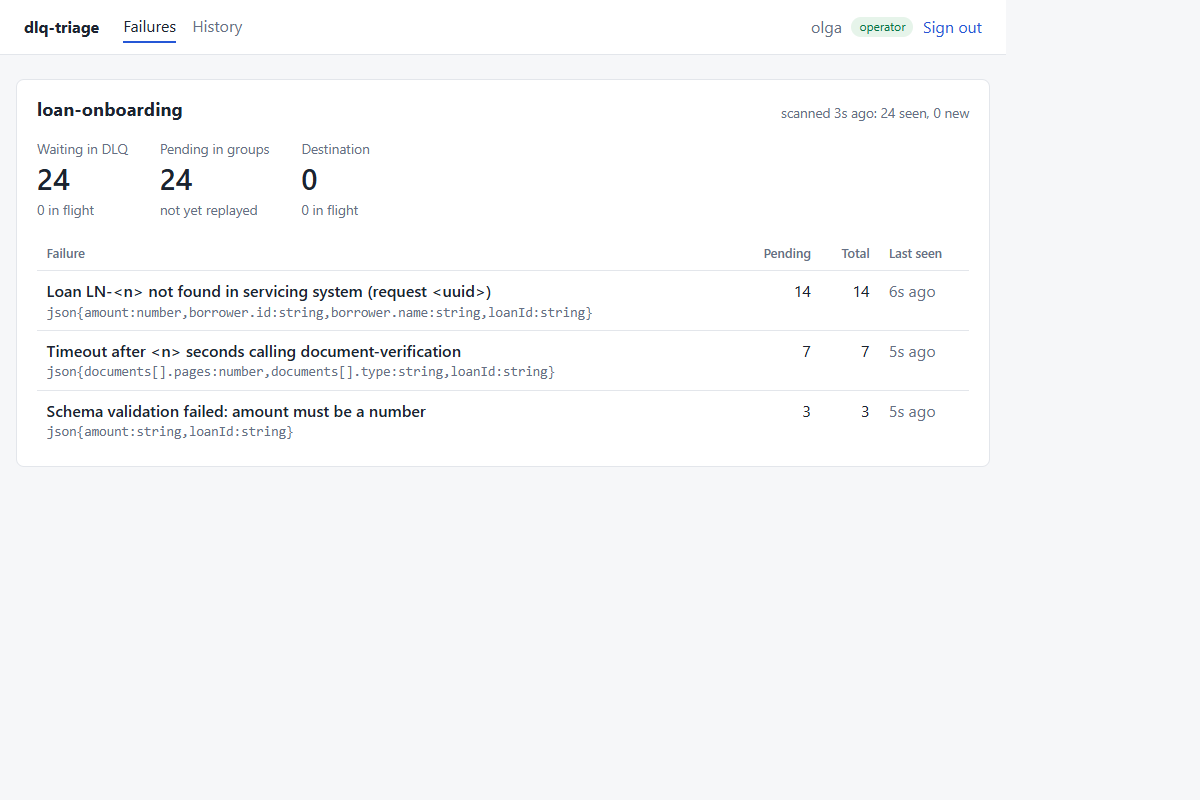
| What went wrong | Messages |
|---|---|
| Loan not found in the servicing system | 14 |
| Timed out calling document verification | 7 |
| Bad data: an amount that isn't a number | 3 |
The error text had different loan numbers and request IDs in every message. The tool ignores those details, so 14 slightly different messages count as one problem.
What it does, in order
- Reads the failed messages (without removing them)
- Groups the ones that failed for the same reason
- You pick a group and run a practice run
- If the count looks right, send the group back, slowly
- Everything is written to a log
The rule I built around
Sending messages back is the one step you can't take back. So the tool makes you look first, practise first, and go slowly — and it never needs to show a support person the private contents of a message.
// what it looks like
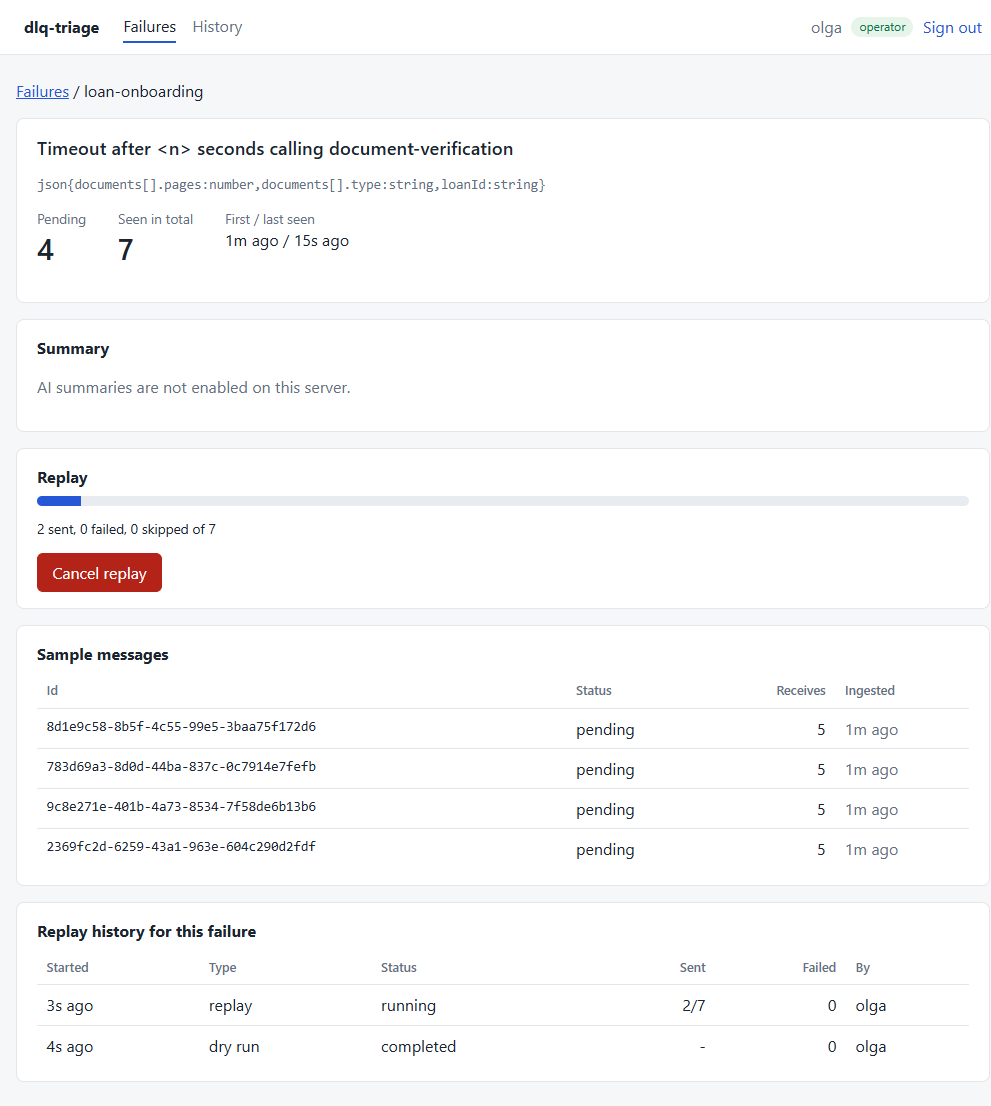
Real screenshots from a test run
Taken from the running app against a local test queue, not mock-ups.
// the safety features
What stops it from making things worse
Practice run first
It tells you “this would send 14 messages” and changes nothing. The real button stays locked until you have done it.
A speed limit
Messages go back at a rate you choose, such as 5 a second, so a struggling system isn’t flooded the moment it recovers.
One at a time
A group can only be sent back by one person at once, so two people can’t double-send it.
A stop button
Stop partway and it records exactly how many went. Run it again later and it carries on without repeating those.
A record of who did what
Every practice run, start, finish and stop is logged with the person’s name.
Two kinds of user
Viewers can see the groups but not the message contents. Only operators can send anything back.
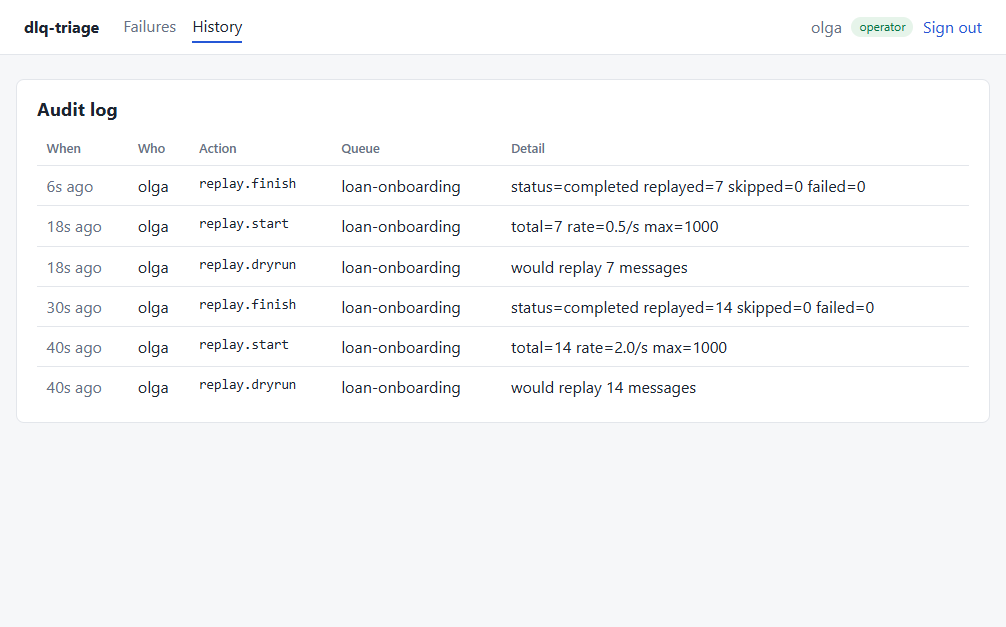
The log after two practice runs and two real ones.
the AI part
Optional, and off by default.
If you connect an AI service, an operator can ask for a one-paragraph explanation of a group. The AI is only shown the error text and the outline of the data (for example “has an amount and a loan ID”). It never sees the actual values, so no customer data leaves.
Honest status: the screenshots here are with AI switched off. The AI part is tested against a stand-in server, not yet against a live model.
What it can't do yet
- • A message can occasionally be delivered twice if the tool stops at the wrong moment. The receiving system has to cope with that.
- • Reading a queue counts as an attempt in AWS, so scanning too often uses up retries.
- • Tested against a local imitation of AWS's queue service (moto), not the real one.
- • Works with AWS SQS only, and runs as a single copy.
- • Sign-in is fixed access tokens, not company single sign-on.
// how it was built
One program, tested end to end
The backend is Go with a GraphQL interface, the dashboard is React, and both ship inside a single program with a small SQLite file for its own records. Tests cover the grouping, the safe-retry logic (including a crash halfway through), the sign-in rules, and a full run against the local queue.
Two bugs I caught only by running it for real: the progress bar sat at zero during a slow retry because progress was saved every ten messages, and the background scan could grab messages the retry was about to use. Both are fixed and have tests.